

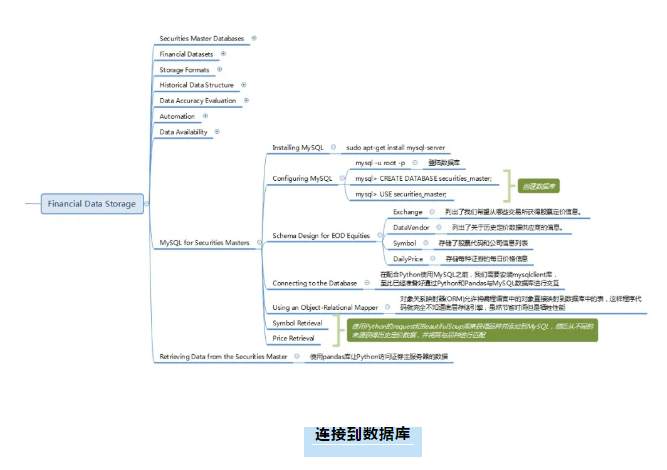
在配合Python使用MySQL之前,我们需要安装mysqlclient库。mysqlclient实际上是另一个库的分支,称为Python-MySQL。不幸的是,Python3不支持后一个库,因此我们必须使用mysqlclient。在Mac OSX/UNIX类型的机器上,我们需要运行以下命令:
sudo apt-get install libmysqlclient-dev
pip install mysqlclient
现在,我们已经准备好通过Python和pandas与MySQL数据库进行交互。
使用对象关系映射器
对于那些具有数据库管理和开发背景的人,您可能会问,使用对象关系映射器(ORM)是否更明智。ORM允许将编程语言中的对象直接映射到数据库中的表,这样程序代码就完全不知道底层存储引擎。他们不是没有他们的问题,但他们可以节省大量的时间。然而,节省时间通常是以牺牲性能为代价的。
一个流行的Python ORM是SQLAlchemy。它允许您在Python本身中指定数据库模式,从而自动生成CREATE TABLE代码。由于我们特别选择了MySQL,并且关注性能,所以本章选择不使用ORM。
品种检索
让我们从获取与标准普尔500只大盘股相关的所有股票代码开始,即标准普尔500指数。当然,这只是一个例子。如果你在英国进行交易,并希望使用英国国内指数,你同样可以获得在伦敦证交所(LSE)交易的FTSE100家公司的名单。维基百科方便地列出了标准普尔500指数的成分股。请注意,在标准普尔500指数中实际上有502个成分!我们将使用Python的request和BeautifulSoup库来抓取网站,然后直接将内容添加到MySQL中。首先,确保安装了库:
pip install requests
pip install beautifulsoup4
下面的代码将使用requests和BeautifulSoup库将这些品种直接添加到前面创建的MySQL数据库中。请记得将“密码”替换为您所选择的密码,如下所示:
#!/usr/bin/python
# -*- coding: utf-8 -*-
# insert_symbols.py
from __future__
import print_function
import datetime
from math import ceil
import bs4
import MySQLdb as mdb
import requests
def obtain_parse_wiki_snp500():
"""
Download and parse the Wikipedia list of S&P500
constituents using requests and BeautifulSoup.
Returns a list of tuples for to add to MySQL.
"""
# Stores the current time, for the created_at record
now = datetime.datetime.utcnow()
# Use requests and BeautifulSoup to download the
# list of S&P500 companies and obtain the symbol table
response = requests.get( "http://en.wikipedia.org/wiki/L..." )
soup = bs4.BeautifulSoup(response.text)
# This selects the first table, using CSS Selector syntax
# and then ignores the header row ([1:])
symbolslist = soup.select(’table’) .select(’tr’)[1:]
# Obtain the symbol information for each
# row in the S&P500 constituent table
symbols = []
for i, symbol in enumerate(symbolslist):
tds = symbol.select(’td’)
symbols.append(
(
tds.select(’a’).text, # Ticker
’stock’,
tds .select(’a’).text, # Name
tds .text, # Sector
’USD’, now, now
)
)
return symbols
def insert_snp500_symbols(symbols):
"""
Insert the S&P500 symbols into the MySQL database.
"""
# Connect to the MySQL instance
db_host = ’localhost’
db_user = ’sec_user’
db_pass = ’password’
db_name = ’securities_master’
con = mdb.connect(
host=db_host, user=db_user, passwd=db_pass, db=db_name
)
# Create the insert strings column_str = """ticker, instrument, name, sector,
currency, created_date, last_updated_date
"""
insert_str = ("%s, " * 7)[:-2]
final_str = "INSERT INTO symbol (%s) VALUES (%s)" % \
(column_str, insert_str)
# Using the MySQL connection, carry out
# an INSERT INTO for every symbol
with con:
cur = con.cursor()
cur.executemany(final_str, symbols)
if __name__ == "__main__":
symbols = obtain_parse_wiki_snp500()
insert_snp500_symbols(symbols)
print("%s symbols were successfully added." % len(symbols))
在此阶段,我们将在数据库中包含标准普尔500指数的所有502个当前符号成分。我们的下一个任务是实际地从不同的来源获得历史定价数据,并将其与品种进行匹配。
价格检索
为了获得当前标准普尔500指数成分股的历史数据,我们必须首先查询数据库中的所有符号列表。一旦返回了符号列表和符号id,就可以调用Yahoo Finance API并下载每个符号的历史定价数据。一旦我们有了每个品种,我们就可以依次将数据插入数据库。下面是实现这一点的Python代码:
#!/usr/bin/python
# -*- coding: utf-8 -*-
# price_retrieval.py5
from __future__ import print_function
import datetime
import warnings
import MySQLdb as mdb
import requests
# Obtain a database connection to the MySQL instance
db_host = ’localhost’
db_user = ’sec_user’
db_pass = ’password’
db_name = ’securities_master’
con = mdb.connect(db_host, db_user, db_pass, db_name)
def obtain_list_of_db_tickers():
"""
Obtains a list of the ticker symbols in the database.
"""
with con:
cur = con.cursor()
cur.execute("SELECT id, ticker FROM symbol")
data = cur.fetchall()
return [(d, d) for d in data]
def get_daily_historic_data_yahoo(
ticker, start_date=(2000,1,1),
end_date=datetime.date.today().timetuple()[0:3]
):
"""
Obtains data from Yahoo Finance returns and a list of tuples.
ticker: Yahoo Finance ticker symbol, e.g. "GOOG" for Google, Inc.
start_date: Start date in (YYYY, M, D) format
end_date: End date in (YYYY, M, D) format
"""
# Construct the Yahoo URL with the correct integer query parameters
# for start and end dates. Note that some parameters are zero-based!
ticker_tup = (
ticker, start_date-1, start_date ,
,
start_date, end_date-1, end_date,
end_date
)
yahoo_url = "http://ichart.finance.yahoo.co..."
yahoo_url += "?s=%s&a=%s&b=%s&c=%s&d=%s&e=%s&f=%s"
yahoo_url = yahoo_url % ticker_tup
# Try connecting to Yahoo Finance and obtaining the data
# On failure, print an error message.
try:
yf_data = requests.get(yahoo_url).text.split("\n")[1:-1]
prices = []
for y in yf_data:
p = y.strip().split(’,’)
prices.append(
(datetime.datetime.strptime(p, ’%Y-%m-%d’),
p, p, p, p , p
, p , p
, p )
)
)
except Exception as e:
print("Could not download Yahoo data: %s" % e)
return prices
def insert_daily_data_into_db(
data_vendor_id, symbol_id, daily_data
):
"""
Takes a list of tuples of daily data and adds it to the
MySQL database. Appends the vendor ID and symbol ID to the data.
daily_data: List of tuples of the OHLC data (with
adj_close and volume)
"""
# Create the time now
now = datetime.datetime.utcnow()
# Amend the data to include the vendor ID and symbol ID
daily_data = [
(data_vendor_id, symbol_id, d, now, now,
d, d, d, d, d, d)
for d in daily_data
]
# Create the insert strings
column_str = """data_vendor_id, symbol_id, price_date, created_date,
last_updated_date, open_price, high_price, low_price,
close_price, volume, adj_close_price"""
insert_str = ("%s, " * 11)[:-2]
final_str = "INSERT INTO daily_price (%s) VALUES (%s)" % \
(column_str, insert_str)
# Using the MySQL connection, carry out an INSERT INTO for every symbol
with con:
cur = con.cursor()
cur.executemany(final_str, daily_data)
if __name__ == "__main__":
# This ignores the warnings regarding Data Truncation
# from the Yahoo precision to Decimal(19,4) datatypes
warnings.filterwarnings(’ignore’)
# Loop over the tickers and insert the daily historical
# data into the database
tickers = obtain_list_of_db_tickers()
lentickers = len(tickers)
for i, t in enumerate(tickers):
print(
"Adding data for %s: %s out of %s" %
(t, i+1, lentickers)
)
yf_data = get_daily_historic_data_yahoo(t)
insert_daily_data_into_db(’1’, t, yf_data)
print("Successfully added Yahoo Finance pricing data to DB.")
请注意,当然有一些方法可以优化这个过程。例如,如果我们使用Python ScraPy库,我们将从下载中获得高并发性,因为ScraPy构建在事件驱动的Twisted框架上。目前,每个下载将按顺序执行。
【交易学习】
【交易员洞察】
【基础知识】
【货币交易】
【黄金交易】
Peringatan: Pendapat yang disampaikan sepenuhnya merupakan milik penulis dan tidak mencerminkan posisi resmi Followme. Followme tidak bertanggung jawab atas keakuratan, kelengkapan, atau keandalan informasi yang disediakan, serta tidak bertanggung jawab atas tindakan apa pun yang diambil berdasarkan konten ini, kecuali dinyatakan secara tertulis.

Tinggalkan pesan Anda sekarang